
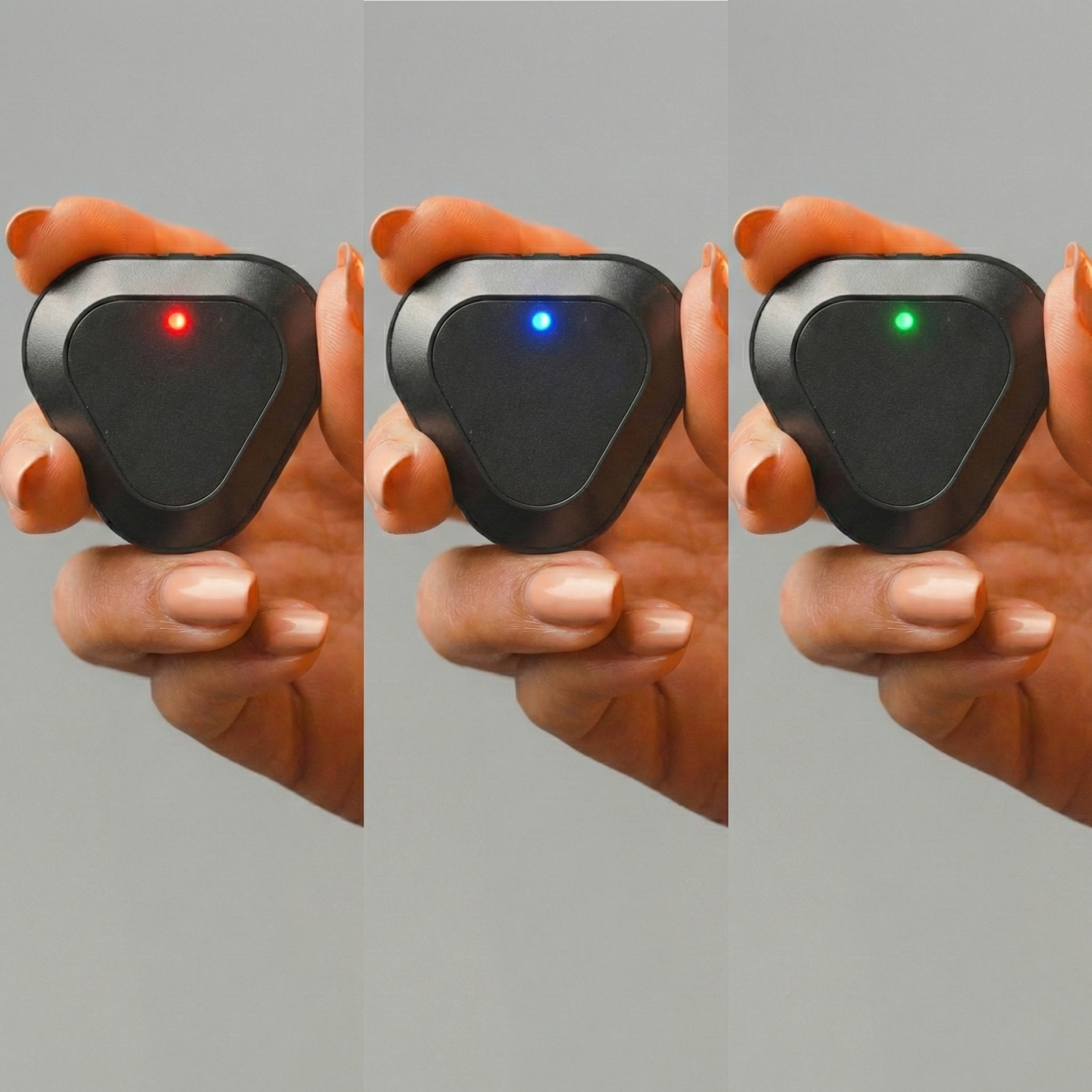
As smart devices become a part of our daily lives, small indicator lights have started to carry big meanings. Especially for products that are used throughout the day—such as smart posture devices—being able to correctly interpret LED indicators is essential to get maximum efficiency from the device.
Kodgem Straight is equipped with an intelligent LED light system that informs the user without the need to constantly check a screen.
So what do these lights mean? Which color appears in which situation? Let’s clarify it together.
What Does the Red Light Mean?

The red LED is related to Kodgem Straight’s power and charging status. It mainly warns the user about a low battery level.
The red light turns on in the following situations:
- While the device is charging (if the battery is not yet fully charged)
- When the device powers off
- When the device button is pressed and there is no charge
- When the battery level drops below 5%
Important Note:
If the battery is completely depleted, no LED light will turn on. This indicates that the device is powered off and not receiving any energy.
Low-battery warnings are critical to prevent the device from shutting down unexpectedly during use.
What Does the Blue Light Mean?

The blue LED indicates that Kodgem Straight is searching for a Bluetooth connection.
The blue light turns on in the following situations:
- While the device is searching for Bluetooth
- When the device is off and single-clicked
At this stage, the device is ready to pair with the mobile application.
If the blue light is on, simply check:
- Is Bluetooth enabled on your phone?
- Is the Kodgem Straight mobile application running?
Blue light = “I’m ready to connect.”
What Does the Green Light Mean?

The green LED is a positive status indicator showing that Kodgem Straight is ready for use.
The green light turns on when:
- The battery is fully charged
- A successful connection is established with the phone
When the green light is on, the device:
- Is ready for use
- Works synchronously with the mobile application
Green light = sufficient power + correct connection
Why Is the Kodgem Straight LED System Important?
Kodgem Straight’s LED system:
- Does not force the user to look at a screen
- Communicates the device status at a single glance
- Simplifies the overall user experience
This makes Kodgem Straight not just a posture trainer, but a smart, intuitive, and user-friendly assistant.
What Should You Do If the LED Lights Do Not Turn On?
In some cases, users may worry that “Kodgem Straight LED lights are not turning on.” In most situations, this is not a technical malfunction, but simply due to a fully depleted battery.
1. The Battery May Be Completely Depleted
If the battery level drops to 0%, Kodgem Straight will not display any LED lights.
What you should do:
- Plug the device into a charger
- Leave it charging for at least 15 minutes
- This time is necessary for the battery to “wake up”
It is normal for the LEDs not to turn on immediately when the battery is completely drained.
2. Check the Charging Adapter
The power output of the adapter is important for proper charging.
- Use an adapter with at least 5V output
- Standard phone chargers are suitable
- Low-voltage adapters may prevent the device from detecting the charge
Proper power output is the foundation of safe and efficient charging.
3. Check the Cable and Connections
One of the most common causes of charging issues is cable-related problems.
Make sure that:
- The Type-C charging cable included in the box is being used
- The cable works with another device
- There are no breaks or connection issues in the cable
If possible, test the device with another reliable Type-C cable.
How Is Kodgem Straight Charged?
Kodgem Straight is charged using the Type-C charging cable included in the box.
What you should know about the charging process:
- Fully charges in approximately 1 hour and 45 minutes
- Provides around 2 weeks of usage on a full charge
- This places it among the posture trainer devices with the longest battery life worldwide
During charging:
- The LED light indicates that charging is active
- When charging is complete, the green light turns on
Why Such a Long Battery Life?
Kodgem Straight’s extended battery life:
- Eliminates the need for frequent charging in daily use, offering continuous and sustainable posture training
- Keeps the user focused on posture awareness, not on the device itself
This approach transforms Kodgem Straight into more than just a device—it becomes a tool for building sustainable posture habits.
In Summary
- Red LED → Battery and charging status
- Blue LED → Bluetooth connection in progress
- Green LED → Device ready, posture tracking active
- If no LED lights are on → The battery may be completely depleted
- Leave the device charging for at least 15 minutes
- Use a 5V output adapter
- Always check the Type-C cable
- Full charge time → 1 hour 45 minutes
- Usage time → Approximately 2 weeks
Thanks to its LED indicators, Kodgem Straight provides users with clear, real-time information about charging, connection, and usage status.
This content is for informational purposes only and does not constitute medical advice. If you have specific health concerns, please consult a qualified healthcare professional.



Leave a comment
This site is protected by hCaptcha and the hCaptcha Privacy Policy and Terms of Service apply.